
XML-RPC is widely used technology, It works by sending a HTTP request to a server implementing the protocol. The client in that case is typically software wanting to call a single method of a remote system. In our case we will create a method which allow clients to create node through HTTP request. Fortunately Drupal 7 support XML-RPC very well, you might noticed the xmlrpc.php file in the core directory of Drupal 7 !
Anyway before getting in more details here is the structure of the content type that we will create the node in programmatically
| Content type | Machine name |
|---|---|
| Student Status | student_status |
| Field | Machine name | Type |
|---|---|---|
| Bus Name | field_status_bus_name | Node Reference |
| Student Name | field_status_student_name | Node Reference |
| Bus Latitude | field_status_bus_latitude | Text |
| Bus Longitude | field_status_bus_longitude | Text |
Anyway lets start by creating our custom module, I assume you know how to create custom module and you already created the .info file.
Inside the .module file we will implement hook_xmlrpc() which identify new XML-RPC method that will be used in creating the node
/**
* Implementation of hook_xmlrpc().
*/

function sos_services_xmlrpc() { // replace sos_services with the name of your custom module
	$methods['studentstatus.student'] = 'studentstatus_student'; // studentstatus.student is the XML-RPC method that will be called remotely while studentstatus_student is the PHP function that we should create and will be triggered when studentstatus.student is called remotely
	return $methods ;
}
Now lets create the PHP function studentstatus_student that will be implemented while calling the XML-RPC method studentstatus.student
/**
* Function to save a new node of type student_status
*/

function studentstatus_student($student_nid, $bus_nid, $current_location_x, $current_location_y){
	if(empty($student_nid) ||  empty($bus_nid) || empty($current_location_x) || empty($current_location_y)) {
		// Make sure that client passing the 4 values for the 4 unique fields...
		return 0 ;
	}else{
		// Save a new node
		$student_record = (object) NULL;
		$student_record->title = "New student status - " . date("m/d/Y H:I", time());
		$student_record->type = 'student_status';
		$student_record->uid = 0; // Author is anonymous in our case... Replace 0 with the author UID

		$student_record->language = "und" ;
		$student_record->field_status_bus_name['und'][0]['nid'] = $bus_nid ;
		$student_record->field_status_student_name['und'][0]['nid'] = $student_nid ;
		$student_record->field_status_bus_latitude['und'][0]['value'] = $current_location_x ;
		$student_record->field_status_bus_longitude['und'][0]['value'] = $current_location_y ;

		node_save($student_record) ;

		return 1  ;
	}
}
Go and enable the new module...make sure you have no syntax error :) (i didn't test the code above actually). You should test the new XML-RPC method using your client but anyway i usually use http://www.tomhost.de/dev/tools/xmlrpc-tt/ tool to test the new XML-RPC methods.
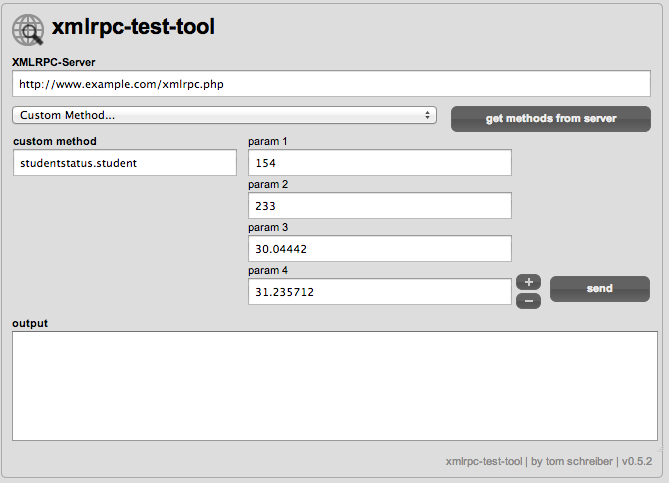
When you click send you must see "1" returned in the output field in the test tool. you can get back into your website and make sure that a new node has been created.
Good Luck...
Maged Eladawy